
Chasing receipts, lost reimbursements, and late reports waste time and money. The right mobile expense reporting tools solve that by letting employees capture receipts, create reports, and get approvals from anywhere — so finance teams close books faster and employees get paid on time.
What are mobile expense reporting tools?
Mobile expense reporting tools are apps and platforms that let users record expenses, snap receipts, and submit reports using smartphones or tablets. They automate data capture, apply policies, route approvals, and sync with accounting systems.
Why mobile expense reporting tools matter
Manual expense workflows are slow, error-prone, and costly. Mobile tools reduce processing time, enforce compliance, and improve visibility into spend. That means fewer mistakes, faster reimbursements, and better budgeting.
Top mobile expense reporting tools for businesses
Below are widely used tools that balance features, mobile UX, and integrations. Each entry includes key pros and cons to help you choose.
1. Expensify
Expensify is known for smart receipt scanning and automatic categorization. Its mobile app is intuitive for travelers and field teams.
Pros: Fast receipt scanning, automatic card reconciliation, flexible approval workflows. Cons: Can be costly for large teams; advanced features require higher plans.
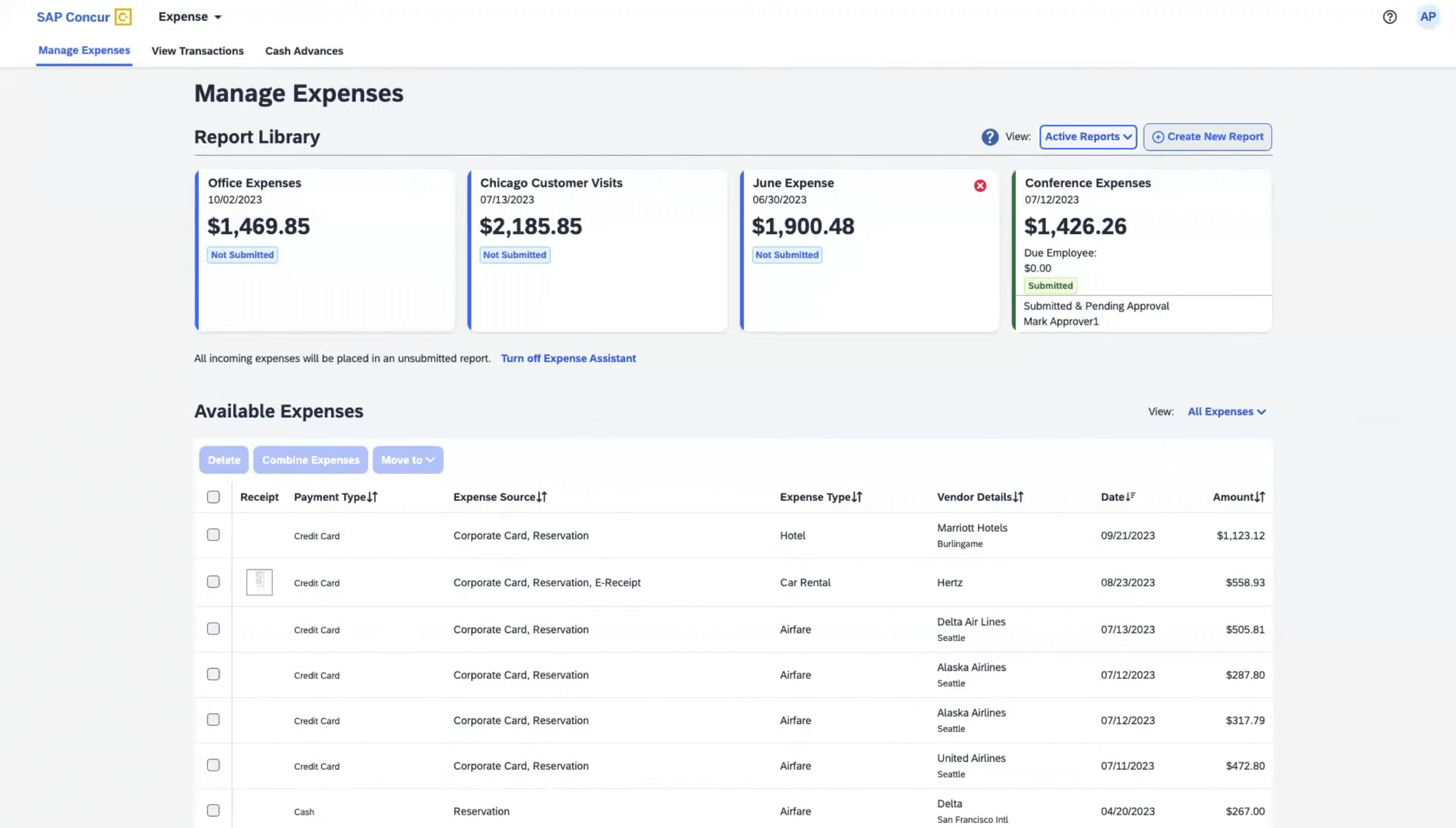
2. SAP Concur
Concur is enterprise-grade with deep integrations for travel and ERP systems. It handles complex policies and global compliance needs.
Pros: Robust policy controls, travel booking integration, global support. Cons: Higher implementation cost, steeper learning curve.
3. Zoho Expense
Zoho Expense offers a strong feature set at a competitive price, with seamless integration into the Zoho suite and common accounting tools.
Pros: Affordable, easy to set up, good automation for small and mid-size teams. Cons: Fewer advanced enterprise features compared to Concur.
4. Rydoo
Rydoo focuses on real-time expense reporting with a simple mobile interface and fast approvals, ideal for mid-market companies.
Pros: Real-time expense submission, good UX, clear policy enforcement. Cons: Limited global payroll and ERP integrations for some markets.
5. Certify (SpendHQ)
Certify is flexible and user-friendly with strong reporting capabilities and smart receipt capture.
Pros: Clean interface, strong reporting, reliable OCR. Cons: Some users report inconsistent customer support response times.
Benefits of using mobile expense reporting tools
- Faster reimbursements through instant receipt capture and submission.
- Reduced errors and manual data entry thanks to OCR and card feeds.
- Improved compliance with automated policy checks and audit trails.
- Better visibility into employee spend and real-time reporting.
- Lower processing costs and fewer lost receipts.
Comparison table
| Feature | Expensify | SAP Concur | Zoho Expense | Rydoo | Certify |
|---|---|---|---|---|---|
| Mobile OCR | Excellent | Excellent | Good | Good | Good |
| Card Feed | Yes | Yes | Yes | Yes | Yes |
| Approval Workflow | Flexible | Enterprise-grade | Configurable | Simple & fast | Configurable |
| Integrations | Many | Extensive | Good | Growing | Solid |
| Best for | Small to mid-size & travelers | Large enterprises | SMBs | Mid-market | Mid-market & finance teams |
Pricing overview
Pricing varies by features, user count, and integrations. Typical models include per-user monthly fees or tiered plans.
Expensify: Free trial, then per-user/month plans; higher tiers for advanced approvals and integrations. SAP Concur: Custom pricing, usually higher for enterprise implementations and add-ons. Zoho Expense: Low-cost per-user/month plans with affordable enterprise options. Rydoo: Tiered pricing per user; mid-market focused. Certify: Per-user pricing with volume discounts.
When evaluating cost, include implementation, integration, and ongoing admin time. A slightly higher subscription can pay off with time saved and fewer reimbursement mistakes.
Expert insight
Finance leaders say the most important factors are mobile OCR accuracy, seamless card integration, and configurable approval workflows. A strong vendor should offer reliable onboarding and clear integrations with your ERP or accounting system.
Choose a tool that fits your team size and complexity. For global companies, favor platforms with multi-currency and multi-jurisdiction support. For fast-growing startups, prioritize tools that scale without heavy upfront setup.
How to choose the right tool
Step 1: Map your process
Document how expenses are created, approved, and reimbursed today. Identify pain points like lost receipts or approval delays.
Step 3: Test with real users
Run a pilot with frequent travellers and finance approvers. Check mobile OCR accuracy and the time it takes to close a report.
Step 2: Check integrations
Confirm the tool syncs with your accounting software, corporate card providers, and payroll systems to avoid duplicate work.
Step 4: Measure ROI
Track processing time, error rates, and reimbursement speed before and after deployment. That shows real value to stakeholders.
FAQs
1. Are mobile expense reporting tools secure?
Yes. Reputable tools use encryption, role-based access, and compliance certifications. Check vendor security docs and data residency options.
2. Do these tools work offline?
Many apps allow offline receipt capture and queue submission when the device reconnects to the internet.
3. Can they integrate with corporate cards?
Yes. Most providers support automatic card feeds so card transactions appear and match with receipts automatically.
4. How long does implementation take?
Small teams can start in days to weeks. Enterprises with complex integrations may take months. Plan for testing and user training.
5. Will they replace my accounting software?
No. Expense tools complement accounting systems by handling front-end expense capture and approvals then syncing summarized data into your finance systems.
Conclusion
Mobile expense reporting tools save time, reduce errors, and improve spend visibility. Choosing the right one depends on team size, integrations, and budget. Start with a pilot, measure results, and scale when you see faster reimbursements and cleaner reporting.
Ready to modernize your expense process? Evaluate top options with a short pilot to find the best fit for your business. Best Expense Tracking Software for Small Businesses , Top Corporate Card Software for Fintech Companies , Best Spend Management Software for Businesses (Complete Guide)
Leave a Reply